
2. In the "Databases" section, click on "MySQL Databases" Icon.

3. In "New Database: Username_" field enter a name for the new database you wish to create in the text field.
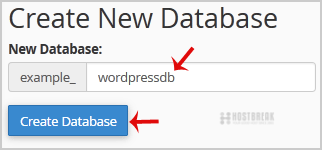
4. Click on the "Create Database" Button.

1. Log into your cPanel account.2. In the "Databases" section, click on "MySQL Databases"...
How to Repair database via phpMyAdmin in cPanel?1. Log into your cPanel account.2. In the "Databases" section, click on "phpMyAdmin" Icon. 3. In...
How to rename a database in cPanel?1. Log into your cPanel account.2. In the "Databases" section, click on "MySQL Databases"...
How to fix [ERROR] /usr/sbin/mysqld: Table '/mysql/user' is marked as crashed and should be repairedIf MySQL is crashed and you check the MySQL logs:- tail -f /var/log/mysqld.log [ERROR]...
How to delete database table via phpMyAdmin in cPanel?1. Log into your cPanel account.2. In the "Databases" section, click on "phpMyAdmin" Icon. 3. In...