
2. In the "Databases" section, click on "MySQL Databases" Icon.

3. In "New Database: Username_" field enter a name for the new database you wish to create in the text field.
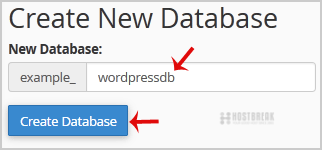
4. Click on the "Create Database" Button.

If MySQL is crashed and you check the MySQL logs:- tail -f /var/log/mysqld.log [ERROR]...
How To Take Backup Or Restore Backup of MS-SQL DatabaseTaking Backups & Restoring of SQL databases using Plesk Applies to: Plesk 9 Plesk 10...
Managing DatabasesWith Plesk you can create multiple databases and multiple users within each database, and make...
What is the website backup policy?Backup Policy: Full automatic backups are made depending on the hosting package. No guarantees...
How to delete a database in cPanel?1. Log into your cPanel account.2. In the "Databases" section, click on "MySQL Databases"...