
2. In the "Databases" section, click on "MySQL Databases" Icon.

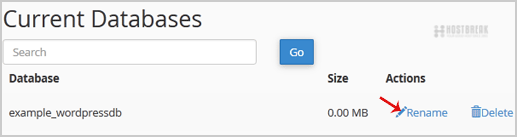
3. Under "Current Databases", You can see list of your all databases. Locate the Database and then click on "Rename" Icon.
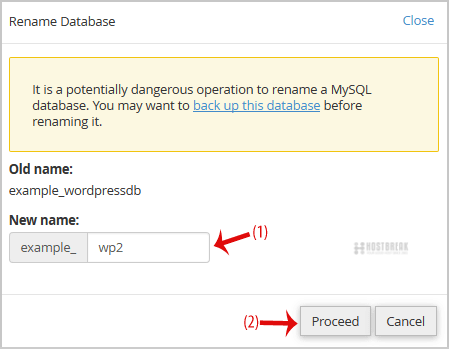
4. Change database name and then click on "Proceed" button.
1. Log into your cPanel account.2. In the "Databases" section, click on "MySQL Databases"...
How to Repair database via phpMyAdmin in cPanel?1. Log into your cPanel account.2. In the "Databases" section, click on "phpMyAdmin" Icon. 3. In...
Plesk - How to Backup DatabasesWith Parallels Plesk Panel, you can back up and subsequently restore the databases, database...
Managing DatabasesWith Plesk you can create multiple databases and multiple users within each database, and make...
How to export database table via phpMyAdmin in cPanel?1. Log into your cPanel account.2. In the "Databases" section, click on "phpMyAdmin" Icon. 3. In...