1. Login to your WordPress admin dashboard.
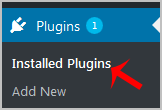
2. Under the dashboard menu, hover your mouse over "Plugins" and then click on "Installed Plugins".
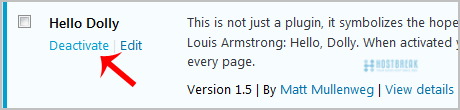
3. If you want to deactivate the €œHello Dolly€� plugin, for example, click on €œDeactivate€�, which appears at bottom of the €œHello Dolly€� text.
How to Delete a Plugin in WordPress?
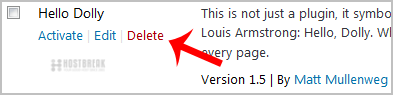
Once a plugin is deactivated, the delete option will appear.
Go to the €œInstalled Plugins€� list and click on the €œDelete€� link which shows at the bottom of the deactivated plugin€™s name. It will display a confirmation. Press €œOK€� and the plugin will be removed.